v0.13.3Patch release
Live voice, documents you review and share, and control over your data
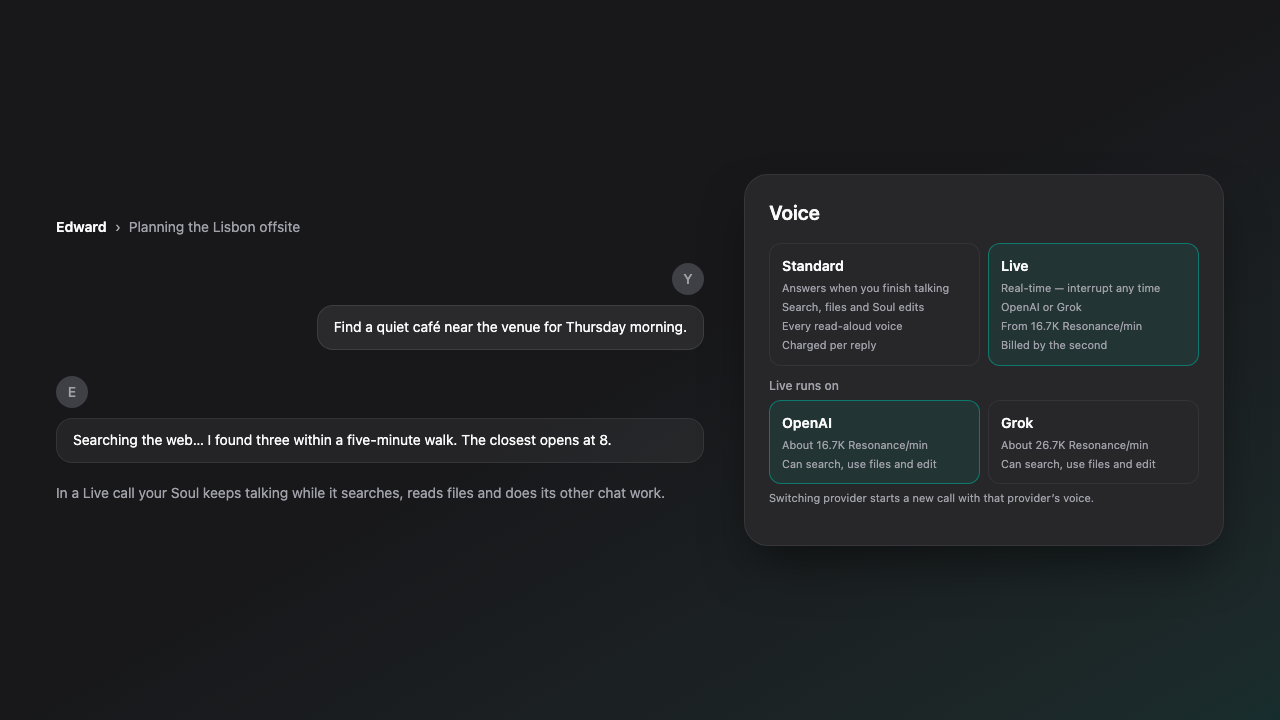
Live voice now works with your Soul's abilities and runs on OpenAI or Grok. Souls propose document edits you review inside the document, and you can edit, share and export what they create. You choose which AI companies may see your data, work with files on your own device, and every Soul now has one Level and a page for its abilities.
New Features
- Talk with your Soul in real time with Live voice, now on OpenAI's GPT-Live as well as Grok, with 21 new Live voices you can preview before you choose one. During a Live call your Soul can search the web, read files and do its other chat work in the background while you keep talking.
- Switch between Standard and Live voice at any time. The voice sheet compares the two side by side with their prices, and says why Live is unavailable when it is. The voice picker groups voices by where they work and names the voice you will hear in each mode.
- Standard voice shows captions and what your Soul is doing, lets you tap the orb to interrupt or send right away, and has a response pace setting.
- Edit a Soul by voice: say the change, review the proposal, then say Save or Undo.
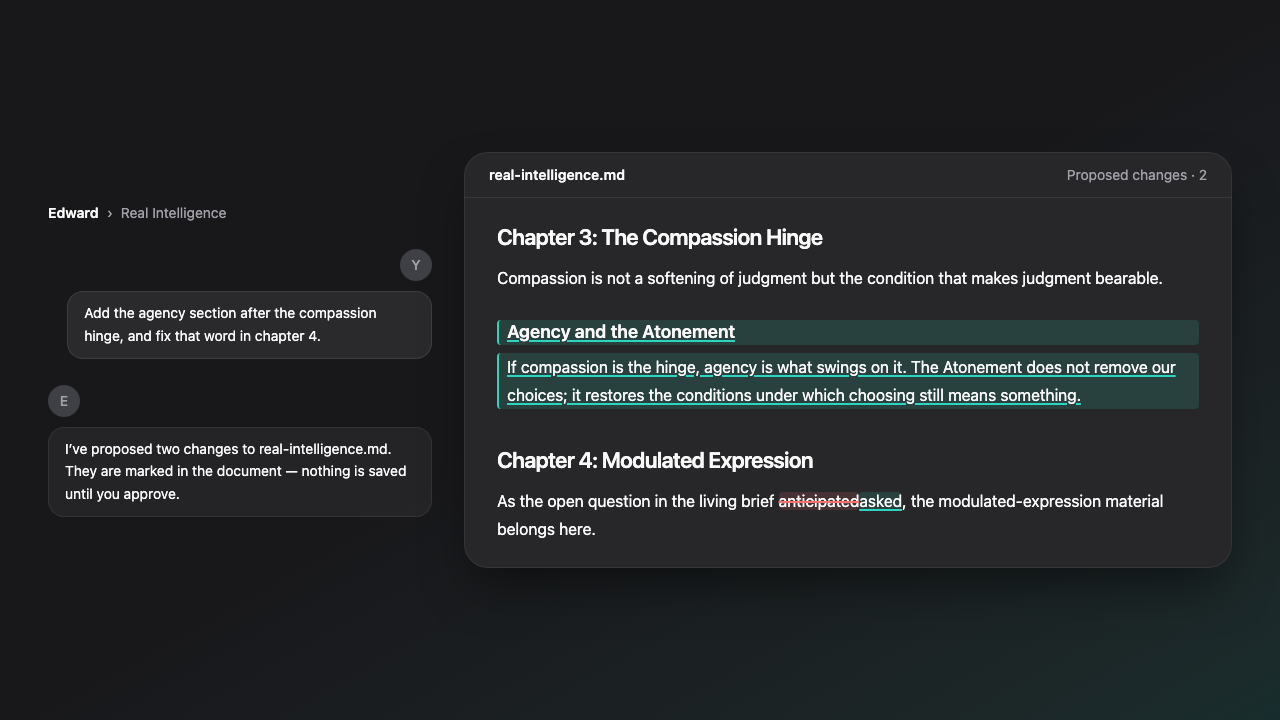
- Souls can edit your project documents. Each proposed change is marked inside the document as added and removed text, you can adjust or drop individual changes, nothing is saved until you approve, and every approved edit is kept as a version you can restore.
- Read project files in a new document viewer with an outline, search and a source view.
- Edit a creation by hand, export it to Google Docs or Google Slides, and share it with a read-only link that you can set to expire or revoke. Whoever has the link needs no Fostera account. It opens a Fostera page with a notice that the creation was shared by a Fostera user and is not from Fostera. Web pages, Markdown, code and SVG images up to 2 MB are shown inside that page with scripts switched off, a PDF opens from the page, and every creation has a download there. The page also has a Report this link control, and your list of links shows how many times each one was viewed and when it was last opened.
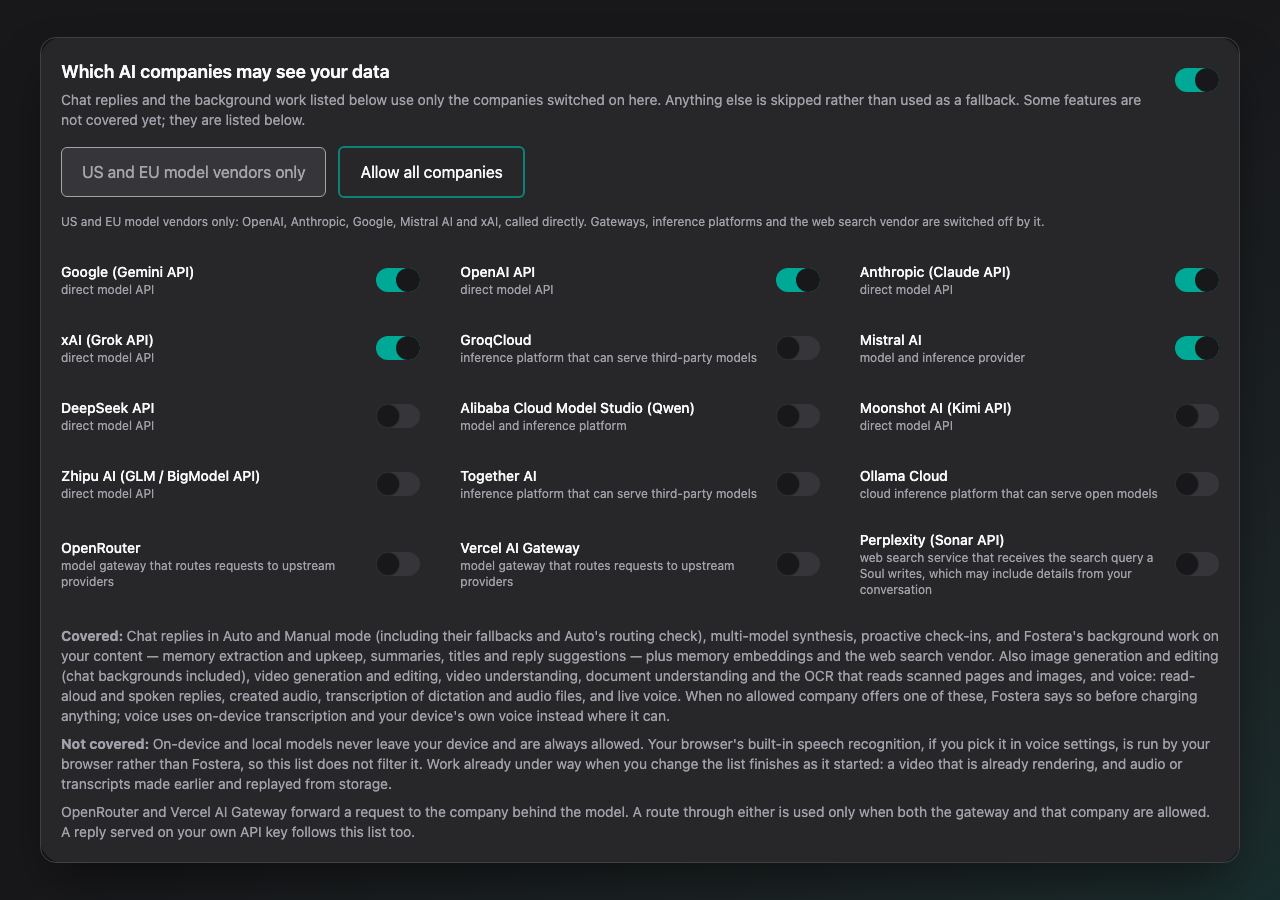
- Choose which AI companies may see your data in Settings, under Privacy & AI: limit Fostera to a list you pick, or use the one-click US and EU model vendors only preset. The list applies to chat, background work, web search, images, video, documents and voice.
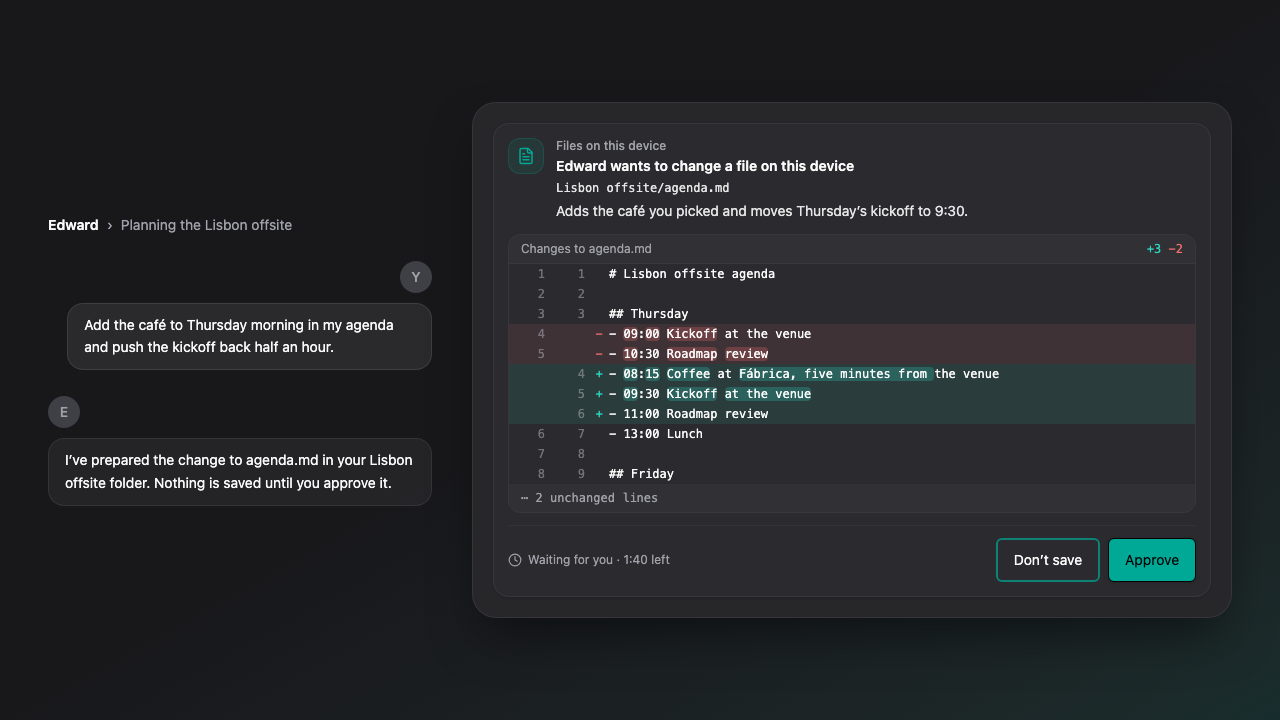
- Work with files on your own device: index a folder in your browser and attach excerpts to a message, and let a Soul read, create and edit text files in a folder you grant, with a preview you approve before every save.
- When a Soul replies with a model running on your device, you can let it read matching excerpts from your indexed folders, and the reply lists the files it read. Link a folder to a project and that folder is searched first in the project's chats.
- Every Soul now has one Level from 1 to 50 with an Experience bar that grows from real work, replacing the earlier growth tiers.
- New pages for each Soul: Abilities, where you set each ability to Auto, Manual or Off and, on its Builds tab, save a set of abilities and Skills as a Build; Skills, where you teach a Soul a reusable procedure and keep its versions; and Models & Devices, where you choose whether a Soul may use cloud models, local models or both.
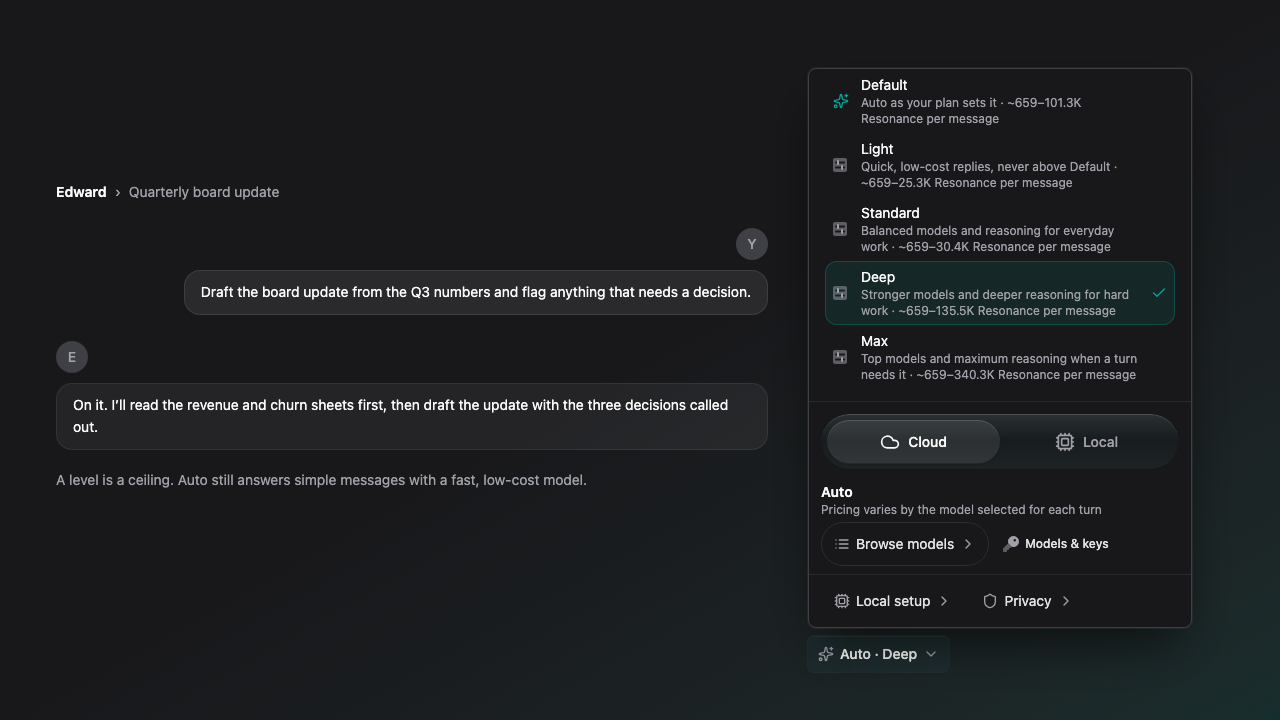
- Auto levels: when a Soul is on Auto, choose how far Auto may go: Light, Standard, Deep or Max. Each level is a ceiling on reasoning, model tier, context, answer length and tool steps, so Auto still answers simple messages with fast, low-cost models and goes up to the level only when a message needs it. Choose it in the composer's model menu or in the Soul's settings. It is saved per Soul, and a Soul with no level chosen
Defaultworks as before. - Start a project in one guided setup: describe the task, add files and instructions, choose a Soul and a template, and review the first message before anything is sent. Save any project's setup as your own template. Discover now offers task starters, such as creating a client report or planning a launch, that set up a Soul and a first message you can edit before you send it.
- Connect Fostera to Claude, ChatGPT, Gemini, Grok and other AI apps by signing in, choose which Soul and permissions each app gets, and manage or disconnect them in Settings. Access keys for a single Soul are also available.
- Replies show the memories and earlier chats they drew on, and you can stop a source from being used again. Souls also find earlier parts of a long chat more reliably, and you can open the original message a memory came from.
- Import from Google Drive and Google Photos wherever you add files, and let a Soul reply in a Gmail thread, cancel a calendar event, or create and edit a Google Doc, each after your approval.
- Download your account as one ZIP file with your chats, memories, Souls
including each Soul's Level, ability settings, Skills and Builds, projects, creations and files. - Get a monthly recap of your work with each Soul, set quiet hours in your own time zone, and receive product announcements as an in-app pop-up, in your inbox, by push or by email.
- Added Gemini 4 Argon, a scrub rail for moving through long chats, sending several photos in one message, and a Switched-to notice when the model changes.
Improvements
- Voice now follows your plan: dictation on every plan; spoken replies, read-aloud, voice previews, hands-free voice mode and audio files a Soul creates on Core and Premium; Live voice calls on Premium. The pricing page now compares plans by Voice and Automation.
- Auto chooses models and abilities more accurately, respects it when you ask it not to search the web, and sends Gmail, Drive and Calendar requests to the right tool.
- On Core, Auto now reasons before writing reports and research answers, and report and project work on Core and Premium keeps much more of the conversation word for word.
- Long uploaded documents are read in full instead of only their first pages, and PDFs are read more reliably: in a file that mixes text and scanned pages, only the scanned pages go through OCR. Research requests and scheduled tasks can take more tool steps.
- Data analysis in projects computes totals, averages, groups and cross-tabs from your CSV and Excel files instead of estimating them, and research dossiers can cite the Gmail threads, Drive files and calendar events your Soul read.
- Scheduled tasks stay on the model that first answered them, and you can see or change that model in the task editor.
- Reply suggestions are calmer: one compact row, a Why these? chip, and suggestions that fit the project you are in or the Soul you are editing.
- Add context now previews project and chat files before you attach them, keeps your selections while you browse, and offers a download when a file type cannot be previewed.
- The installed app accepts PDFs, Office files and audio from your device's share sheet, can open supported files directly on a computer, and shows install steps for your browser.
- Live calls recover from network, microphone and balance interruptions, end exactly when paid time ends, and a last-second top-up keeps the call going. Voice problems show plain messages instead of raw errors, and a failed spoken answer can be replayed.
- Voice billing is fairer: silence is not billed, each spoken sentence is charged once even when audio is retried, and a call that never connects returns its minute.
- The live browser reaches the whole page, responds to taps immediately, is easier to type into, and your chat message hands control back to your Soul.
- Quiet hours now start switched off for adult accounts and have their own section in Settings. Under-18 accounts keep a fixed overnight window.
- The Updates page and its RSS and Atom feeds now list the announcements Fostera publishes, and each entry has its own page with its full set of images.
- A public status page shows current service health and recent reply success.
- The Home sidebar now puts Overview and Inbox at the top, has its own Projects entry, and lists Plans beside Store under Explore.
- Other AI apps now connect to Fostera at one permanent address, https://mcp\.fostera\.ai/mcp\. The earlier beta address has been retired.
- Web pages, emails, calendar events and Drive files a Soul reads are now treated as untrusted reference material, which makes hidden instructions in them harder to act on.
- Retired models are no longer offered in model pickers, Claude Haiku 5.5 now shows its short name and the Swift label in the model picker, and image and video generation no longer fall back to services their providers shut down.
- Premium trials need a card that is not prepaid, with one trial per card and per device, and a new trial includes the Core plan's monthly Resonance until it becomes a paid plan. Replies on your own API key keep correct billing after an interrupted call.
Bug Fixes
- Fixed a plain yes not creating the file your Soul had just offered.
- Fixed answers being cut short, or failing to arrive, when a model's reasoning used up the room meant for its reply. Replies that use reasoning now get more room, in step with the reasoning effort.
- Fixed doubled replies when editing a Soul.
- Fixed reply suggestions that changed on every tap or when switching apps, and suggestions that came back empty.
- Fixed photo uploads failing when an image was not compressed first, and rejected photo messages can be resent.
- Fixed photos waiting to send showing a broken image.
- Fixed the composer menu on the installed iPhone and iPad app.
- Fixed chat titles and summaries coming back empty or cut short on some models.
- Fixed your draft being lost when a project note changed while you were editing it.
- Fixed very large documents rendering slowly in the document viewer.
- Fixed Gmail failing to send to addresses that contain a dot, and calendar cards showing raw timestamps instead of times in your own time zone.
- Fixed the Soul picker not marking the current Soul as selected.
- Fixed the saved-message banner hiding under the top bar.
Limitations
- Spoken replies, read-aloud, voice previews, hands-free voice mode and audio files a Soul creates are no longer included on the Free plan; they need Core or Premium. Dictation stays on every plan.
- Live voice calls now need Premium and an adult account. They run only in regular chats with a Soul you own, not in Quick chats or project chats, and use prepaid Resonance time: the call ends when that time runs out unless you top up.
- Live-only voices cannot read replies aloud. Read-aloud uses a stand-in voice, which the voice picker names.
- Souls can edit text project files only
Markdown and plain text, and an edit is not applied if the file changed after the Soul read it. - Editing a creation by hand works for Markdown and structured documents, on the latest version only. Google export covers documents and slide decks up to 5 MB.
- Share links need an adult account. A link opens one exact version and is shown only once, when you create it. Creations in a Quick chat cannot be shared until you save the chat. Neither can a creation from a chat whose Soul has mature content on, or had it on when the creation was written: mature content is on by default for Companion, Creative partner, Gaming buddy, Dungeon master and Anime companion Souls, and on for any Soul where you allowed it. For creations written from this release on, turning it off later does not make them shareable. Recipients can download PDF, Word, Excel, PowerPoint, CSV, calendar, MP3 and Markdown files in those formats; other creations, such as web pages, SVG images and code, download as plain text only. A link stops working when its chat is deleted or archived, or when its project is archived or deleted with its chats. Restoring from the archive makes the link work again; deleting revokes it for good.
- Files on this device works with text files only, and saving changes needs Chrome or Edge on a computer. Safari, Firefox, iPhone and iPad work from a one-time, read-only copy of the folder. The ability starts switched on for every Soul and you can turn it off. A Soul reads your files only after you allow it, once or for the rest of that chat, and every save waits for your approval.
- The local files index is kept in your browser, is not encrypted, can be cleared by the browser, and has to be built again on each device. Replies read it automatically only when they are written by a model on your device, and only after you turn that on for a Soul.
- The AI company list does not filter models that run on your device or your browser's built-in speech recognition, and work already under way finishes as it started. If no allowed company can do something, Fostera says so instead of using another company.
- PDF reading covers up to 500 pages. Scanned pages are read only when an AI company you allow can do the reading.
- Soul Level is for display only: it does not unlock models, plans, memory or rewards. Abilities added to Fostera later start switched off until you turn them on.
- Skills are written instructions only. The Trials tab is visible but trials cannot be run yet, and pairing a Mac to run local models is not ready for general use.
- The account export has size limits
about 190 MB in totaland can be requested three times a day. Files that do not fit are listed with a download link, and chats that do not fit are listed by title. Billing records and the messages of Souls switched to Local are not in the export. - Higher Auto levels, reasoning and longer context use more Resonance. A level above your plan, unlocked with your own API key, applies its models and reasoning only to replies that run on that key; context and tool steps are capped at your plan's own level, which can be lower than with no level chosen.
- Monthly recaps are billed in Resonance and are not sent during quiet hours.
- Gmail, Calendar, Drive and Photos features need a connected Google account with the permissions each one asks for, and every change a Soul proposes waits for your approval.
- Connecting another AI app needs an adult account. An app connected through the earlier beta address has to be connected again at the permanent address.
- New accounts confirm their email before chatting, sign-ups with disposable email addresses are refused, and free usage is limited to one account per device. Free usage can also be paused for review when an account repeats the imported content of another account on the same device. A new Premium trial's allowance is capped at the Core allowance. Paid subscriptions are never restricted.
- Email updates require a verified address, and push updates require notifications to be turned on in your browser.
- Sharing files into the installed app needs the app installed from Chrome or Edge, on Android or a computer, and opening files directly with it works on a computer only. Neither is available on iPhone or iPad.