v0.15.0Minor release
Connect from chat, and a first chat that starts with you
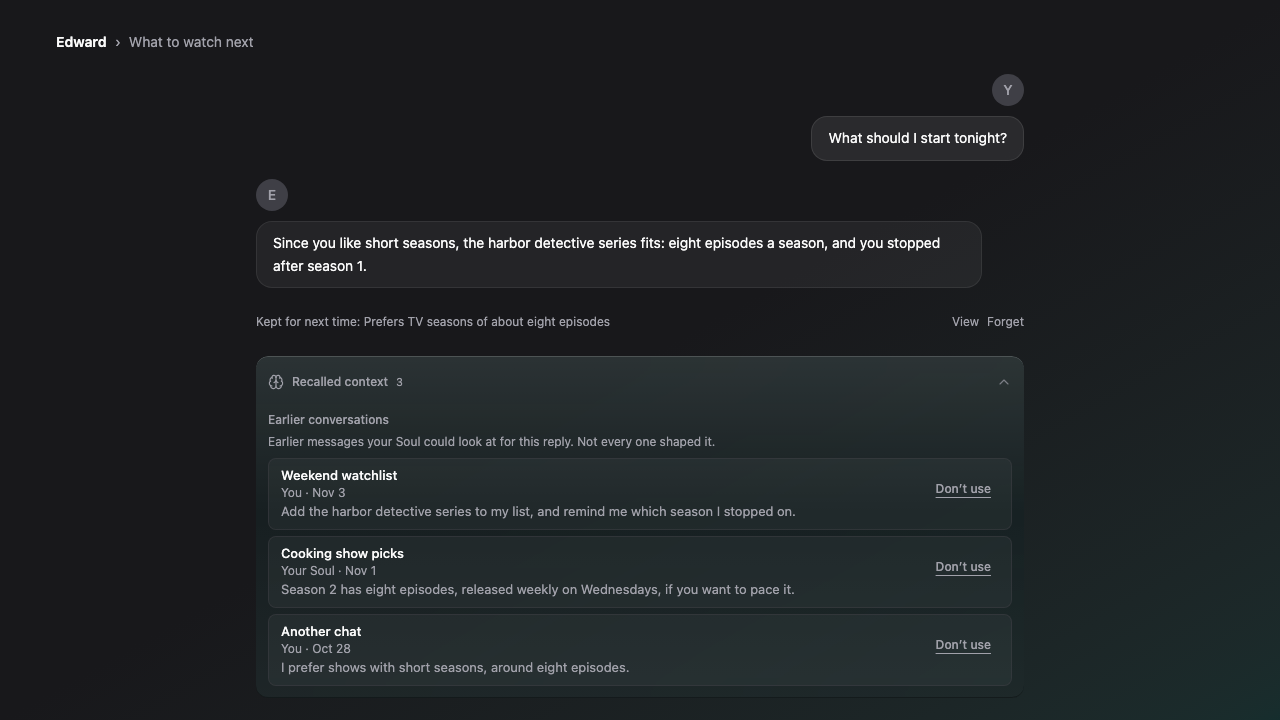
You can connect Gmail, Calendar, Drive and Photos right from the chat and come back to the same conversation, and a reply that needs an app tells you which one. Your first chat starts with your own words, with simple starters to tap. Recalled context shows each source as one short row you can recognize. Task cards say what they do, and Free accounts get a plain answer instead of a card that can't run. Voice calls reach your Soul's abilities, keep turns whole, and keep Keep Talking in reach. Model routing recovers faster and stops benching healthy models.
New Features
- Added connecting Gmail, Calendar, Drive and Photos straight from the chat, returning you to the same conversation with a clear connected or not-connected message.
- Added a quiet Kept for next time line under early replies that saved a memory, with View and Forget.
- Added the last line of each chat to Home cards.
- Added moving a chat into a new project.
- Added simple starters to a new Soul's first chat, including one that looks things up with sources.
- Added an invite you can share after a good moment, plus Copy link and Share buttons in Settings.
- Added pages for common jobs, like keeping project context across chats and research that remembers.
- Added a release-date picker to the admin release import.
Improvements
- Your first message on the start page is now exactly what you typed, and each new Soul opens with a line that fits what you chose.
- Recalled context now shows each source as one row with its chat title, who said it and when, and its first words.
- Task cards now name their real action, such as Schedule, Send or Create draft, and explain why one failed.
- Free accounts asking for reminders or tasks now get a plain answer and a View plans button.
- Ability chips now show roughly how many typical replies an action costs.
- Your Soul now recognizes many more everyday ways of asking for web lookups, images, reminders, files and projects.
- The start page has a clearer Soul choice, tidier spacing at every screen size, and examples that match on phones and desktops.
- The homepage and first-contact pages now say plainly who Fostera is for and what it replaces.
- The privacy policy and Connectors section now describe Google Drive, Photos and Calendar access accurately.
- Voice mode controls now fit in one bar, and Keep Talking stays visible after a Live call drops.
- Lifecycle emails now open your chat with the task ready and link to your last real conversation.
Bug Fixes
- Fixed Live voice requests to search the web or use other abilities failing with no reason.
- Fixed Live voice splitting one spoken request into several pieces.
- Fixed a reply that needed an unconnected app showing a generic error instead of naming the app.
- Fixed one refused conversation or slow request benching a model for everyone.
- Fixed background tasks retrying twice and models staying benched after they recovered.
- Fixed proactive check-ins that couldn't be sent retrying for hours.
- Fixed errors from one failing job crowding out every other error report.
- Fixed public Create buttons dropping you into an empty setup screen instead of the start page.
- Fixed imported releases appearing out of order and today's date being rejected.
Limitations
- Google Drive and Photos access is still under Google's review, so the connect screen may show an unverified-app notice.
- Only clear requests for company go to a Companion automatically on the start page.