v0.18.0Minor release
Trip plans with pinned stops and Google Maps routes, messages your Soul reads mid-reply, and faster replies
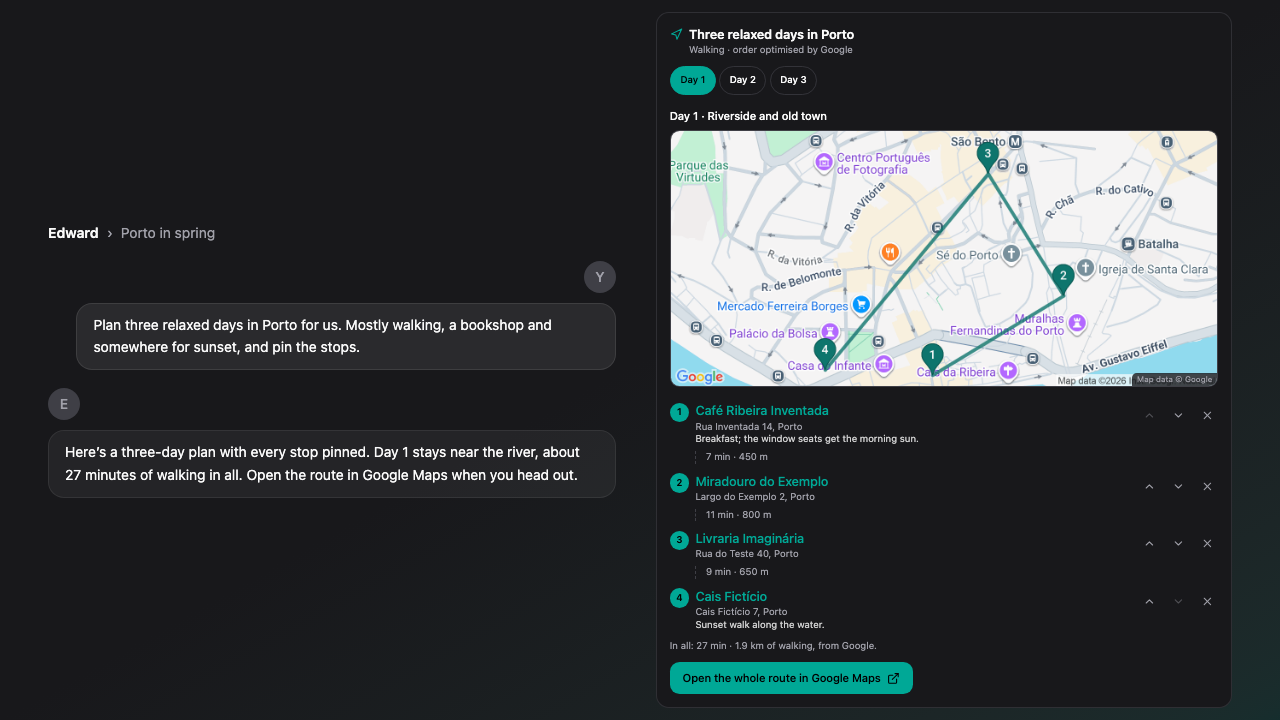
Ask for a trip and your Soul plans it: each day on a map with numbered pins, the stops in order with walking or travel times, and one button that opens the whole day in Google Maps. You can reorder or remove stops. Send a message while your Soul is replying and it goes into the chat at once; the reply reads it at its next step and the message says so. The Default level now answers with the fastest capable model and thinks harder only when a question needs it. Saved drafts lists only what still needs you, the inbox updates the moment you tap, and every New project link opens a new project.
New Features
- Ask your Soul to plan a trip and get each day on a map with numbered pins, the stops in order, and one button that opens the whole day's route in Google Maps. Plans can run up to 7 days.
- Move or remove stops on a trip plan, ask your Soul to add or drop stops, and show walking, driving or cycling times for a day.
- Send a message while your Soul is replying and it goes into the chat at once. It shows Waiting for Soul, then Soul read this once the reply takes it in.
- Inbox groups have Mark all read and Dismiss all, with Undo.
Improvements
- Default now picks the fastest capable model and thinks harder only when a question needs it, like a proof, a bug in your code or a multi-day plan. If you push back on an answer, the next reply thinks more.
- Short replies start sooner: models that think for a long time before writing are passed over for quick questions, and a long chat alone no longer slows small talk down.
- Questions about places, pins and routes are answered without your Soul first asking which map you want.
- When live place details aren't available, your Soul still gives you a Search in Google Maps link and pins stops by name, marked not verified.
- Reply suggestions no longer hold up your next message, and sending cancels any that are still loading.
- Project files open almost instantly the second time, and your Soul reads them faster.
- Mark read, dismiss and mark all read in the inbox take effect at once. Mark all read outside the All tab or during a search marks only the messages you can see, and your search stays in the address bar.
- The Saved drafts card on start screens lists only what needs you: unsent drafts, messages waiting in their chat and sends that didn't go through. Messages that arrived clear themselves, and Discard comes with Undo.
- Every New project link now opens a new project.
- The living brief on a project shows what needs your review first, then the objective and next step. Decisions, constraints and questions are under View full brief.
- The Memory Map no longer redraws while it sits still, waits longer before turning on its own, and stops when you point at it.
- A selected memory on the Memory Map has the same actions as the Memories list, and a selected person or thing opens the Memories list searched for its name.
- On phones the Map tab starts on the first screen, and the map says when it shows only your strongest memories.
- The keyboard shortcuts sheet has room to breathe and its title no longer runs under the close button.
- Tab titles show the project name on a project page.
Bug Fixes
- Fixed your Soul being unable to read files in some newer projects.
- Fixed a project's title and menu being drawn under the Soul header.
- Fixed a project renamed from its menu changing back after its instructions were saved.
- Fixed place questions stalling when Google's place search was unavailable: your Soul now answers with what it can and a Google Maps link.
Limitations
- Trip plans hold up to 7 days and 12 stops a day. A day with many stops opens in Google Maps in parts.
- Map pictures, verified pins and travel times need Google's live data. When it isn't available, stops are found by name, marked not verified, and Google Maps searches for them when you open the route, so check them before you go.
- Travel times on the card aren't offered for public transport. Google Maps shows them when you open the route.
- Default favours speed, so it may reason less on a question that doesn't look like it needs it. Choose a higher level, like Standard or Deep, for more thinking on every reply.
- A reply that has no step left when your message arrives answers it in a new reply right after, instead of reading it mid-reply.
- Saved drafts older than a week are no longer offered.